
We hope you’ll find our new catalogue easy to use - all you need to do to get started is to type a keyword or phrase into the search box at the top right of this page.
There is also an Advanced Search for those who want to refine or restrict their searches or to use additional search features.
If you’d like to know more about using our catalogue then click the links and images below to find out more:
- How to search the catalogue
- How the Royal Mail Archive is organised
- Refining your search
- Browsing collection types, subjects and themes
- Advanced searches
- Map Search
- Adding comments and tags
- Reader order module, Save Search and Wishlists
How to search the catalogue
The simplest way of searching our catalogue is to use the search box, which you will find at the top-right hand corner of every page on our site. Type the name of the object, document or a combination of words relating to the subject you’re looking for and press the the Enter button on your keyboard or the Search icon - any results that match the words you have used in your search will appear in a list.
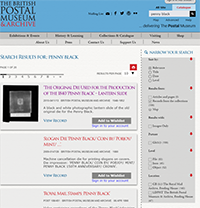
Search results page.
Depending on the word or phrase you’ve entered into the search box, you will see a list of results showing material from each area of our collection.
We have a library of reference books, serials and other publications, we have a museum collection containing objects from The Post Office’s past history, and we have the Royal Mail Archive which contains the official records kept by Royal Mail and the Post Office from the 17th century onwards.
If your search has failed to find any records then it means that the word or phrase you have searched on has not matched to any of the words and phrases used to describe our collection. If this happens, then try other, less specific terms and phrases that may have been used instead of those you have tried. For instance, a search on ‘brandy’ reveals no records, but a search on ‘alcohol’ reveals more records.
The Archives Hub has some very helpful pages on using and searching archives which will be of great assistance to those new to the experience.
How the Royal Mail Archive is organised
Most of the records in the catalogue – in mid-2014 some 92,000 of them – are from the Royal Mail Archive. The archive is arranged hierarchically, with items and files branching out from series which relate to specific departments within Royal Mail (and its predecessor, the Post Office) or to specific functions, subject areas and activities. These series are known as ‘POST classes’ and each is given a number. There are currently over 130 POST classes covering departments such as the Solicitors’ Department and the Engineer in Chief’s Department, to topics like War and Civil Emergencies and Printed Publicity Material.
Matt Tantony (a former archivist at BPMA) has written a blog which explains how the archive is formed.
Refining your search
Once you’ve undertaken a search any results will be displayed according to ‘relevancy’ - meaning results are ranked according to their similarities to the keywards or phrases used in the search. You can alter the sorting of these results using the menu on the side of the page. You can choose to sort by title, date, or level (i.e. by the hierarchical arrangement of the archive).
You can also choose to restrict the search results to show only those records with images, by checking the ‘images only’ box.
Other refinements include choosing to show search results from the catalogue only or by articles and pages that support the catalogue, such as this one.
Browsing collections types, subjects and themes
A key development of this catalogue is its ability to isolate particular elements of each catalogue record and turn them into ‘facets’. These are the clickable links in the menu that show subjects, themes, materials, and people associated with the records. Although much work remains to make these more comprehensive, they can be a quick way into the catalogue.
Advanced Searches
The advanced search tools are really work-in-progress at present, while we iron out how they work. For instance, the Place search requires you to enclose your search term in double quotation marks. So if you were looking for records relating to Wolverhampton, for instance, you would need to type “Wolverhampton” into the Place search box. All the other searches do not require quotation marks.
If you wanted to narrow your search to a specific POST Class from the archive, you can do this in a couple of ways, either enter the POST Class with a ? instead of the space and a truncation symbol * or enter the reference number for the POST Class, followed by the truncation symbol *. For instance, if you want to see all the records in POST Class 20, you should enter POST?20* or P/20/*.
If you know the Finding Number or Object Number of the item whose record you wish to view, the best method is to use the basic search box and enclose the number in double quotation marks. So, for instance, you wish to search for POST 20/1 - type “POST 20/1″ into the search box; alternatively if using the Advanced Search then there is no need to use quotation marks.
We will provide updates regarding the development of the search tools via these pages and via our blog.
Map Search
One of the features that we are planning to implement in the next year is a map-based search. We’re busy adding coordinates to the catalogue descriptons of about 900 photographs of post offices across the country. When these are activated you will be able to browse the map to see the photographs. This feature should be available some time in 2015.
Adding comments and tags
A key part of the catalogue is its ability to accept and display insights from its users. If you feel that a catalogue records lacks keywords that would enhance its findability or describe the material more accurately, then you can submit a comment or tag to the record’s page. We will moderate these and, if we feel that the suggestions are pertinent and appropriate, then we will add them to the catalogue record.
Reader order module, Save Search and Wishlists
This part of the website is also very much a work in progress. In time this should allow full advance ordering of Royal Mail Archive material so that it is ready for you when you arrive at the Freeling House Search Room. Currently provided you register (using a simple form) you can save searches you have made and also compile ‘wish lists’ of material you are interested in.
Should you wish to try out this functionality we will be very grateful since it is only through real time use by researchers that we will work out how best to set up this part of the system and get our processes right so that things work as smoothly as possible for you.